
Color Harmony Guide: Create Stunning Color Combinations That Actually Work
Published on February 4, 2026 • 10 min read
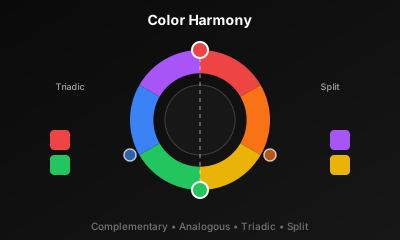
Some color combinations feel right. Others clash painfully. The difference isn't random — it's based on mathematical relationships that artists have understood for centuries. This guide breaks down the science of color harmony so you can create palettes that look intentional, professional, and visually satisfying.
In This Guide
Understanding the Color Wheel
The color wheel is the foundation of all color theory. Created by Isaac Newton in 1666, it organizes colors in a circle based on their chromatic relationship. Every color harmony is defined by specific positions on this wheel.
Primary Colors
Red, Yellow, Blue — cannot be created by mixing other colors
Secondary Colors
Orange, Green, Purple — mixing two primaries
Tertiary Colors
Yellow-Orange, Blue-Green, etc. — mixing primary + secondary
In digital design, we typically use the RGB color wheel, where primary colors are Red, Green, and Blue. The principles of harmony remain the same regardless of which color model you use.
Complementary Colors
Opposite on the wheel
Maximum contrast, high visual impact
Complementary colors sit directly opposite each other on the color wheel. Blue and orange. Red and green. Yellow and purple. When placed next to each other, they create maximum contrast and make each other appear more vibrant.
When to Use Complementary
- Call-to-action buttons that need to stand out
- Sports teams and athletic brands (high energy)
- Emphasis on specific elements
- Creating visual tension or excitement
⚠️ Warning
Pure complementary colors at full saturation can vibrate optically and cause eye strain. Always adjust the saturation or value of at least one color, or use a larger proportion of one color over the other.
Real-World Examples
- Firefox (orange and blue)
- Lakers (purple and gold/yellow)
- Fanta (orange and blue)
Analogous Colors
Neighbors on the wheel
Harmonious, serene, unified
Analogous colors are neighbors on the color wheel — typically 3-5 colors sitting side by side. They share undertones and create a sense of unity and cohesion. Think of a sunset: oranges bleeding into pinks into purples.
When to Use Analogous
- Websites that need to feel calm and harmonious
- Nature-inspired designs
- Backgrounds and gradients
- When you want color variety without contrast
💡 Pro Tip
When using analogous colors, choose one dominant color (60%), one supporting color (30%), and one accent (10%). This prevents the palette from feeling flat or monotonous.
Real-World Examples
- Spotify (greens and blacks)
- BP (green and yellow)
- Instagram gradient (pink, purple, orange)
Triadic Colors
Triangle on the wheel
Vibrant, balanced, dynamic
Triadic colors form an equilateral triangle on the color wheel, with each color 120 degrees apart. This creates a balanced yet vibrant palette. Primary colors (red, yellow, blue) are the most famous triadic combination.
When to Use Triadic
- Children's products and playful brands
- Creative agencies and portfolio sites
- When you need variety with visual balance
- Infographics and data visualization
Triadic schemes can feel overwhelming if all three colors are used equally. The key is to let one color dominate while using the other two as accents.
Real-World Examples
- Burger King (red, yellow, blue)
- Superman (red, yellow, blue)
- Google (uses 4 colors but triadic principles)
Split-Complementary Colors
Y-shape on the wheel
Contrast with less tension
Split-complementary is a safer version of complementary. Instead of using the direct opposite, you use the two colors adjacent to the complement. This provides strong visual contrast without the intensity that can make pure complementary schemes hard to balance.
When to Use Split-Complementary
- When complementary feels too intense
- Beginner-friendly: hard to mess up
- Marketing materials needing visual interest
- Websites with multiple accent colors
This is often recommended for designers who are new to color theory. It's forgiving and almost always looks good.
Tetradic (Rectangle) Colors
Rectangle on the wheel
Rich, complex, challenging
Tetradic schemes use four colors arranged in a rectangle on the wheel — essentially two complementary pairs. This offers the most variety but is also the hardest to balance effectively.
When to Use Tetradic
- Complex dashboards with many data categories
- E-commerce sites with diverse product lines
- Editorial and magazine layouts
- When you need maximum color variety
🎨 Balance Tip
With tetradic schemes, choose one dominant color and use the others sparingly. Keeping three colors muted while letting one shine prevents visual chaos.
How to Choose the Right Harmony
| Harmony Type | Best For | Difficulty |
|---|---|---|
| Complementary | CTAs, sports, high impact | Medium |
| Analogous | Calm sites, gradients, nature | Easy |
| Triadic | Playful, creative, balanced | Medium |
| Split-Complementary | Beginners, safe contrast | Easy |
| Tetradic | Complex UI, dashboards | Hard |
Quick Decision Framework
Define the mood. Calm and unified? Go analogous. Bold and energetic? Try complementary. Playful? Consider triadic.
Count your needs. How many distinct colors do you need? More colors = more complex harmony required.
Start with one. Pick your primary brand color first, then let the harmony rules determine the rest.
Build Your Harmonious Palette
Use ColorHexify to explore different harmony types. Pick a base color and instantly see complementary, analogous, and triadic combinations — with contrast checking built in.
Try ColorHexify FreeThe Bottom Line
Color harmony isn't about following rules blindly — it's about understanding why certain combinations work so you can make informed choices. Start with the simpler harmonies (analogous, split-complementary) and work your way up to more complex schemes as you gain confidence.
Remember: the 60-30-10 rule applies to almost every harmony type. One dominant color (60%), one secondary (30%), and one accent (10%). This ratio creates visual hierarchy and prevents any single color from overwhelming the design.
Now go create something harmonious.